VDSL on SportyHQ — Page 2
Overview of the Buttons for VDSL
If you wish to enter results or see the division schedule click on Division Schedule.
Full results gives currently selected division's standings and some stats.
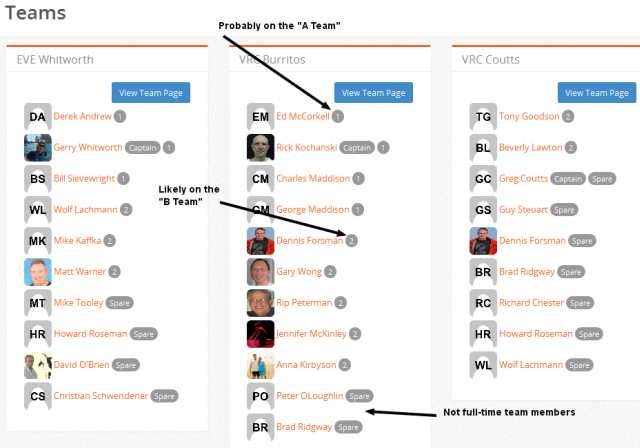
View Teams shows rosters for each team in the division.
Spares — don’t worry about it for now.
The Schedule for VDSL
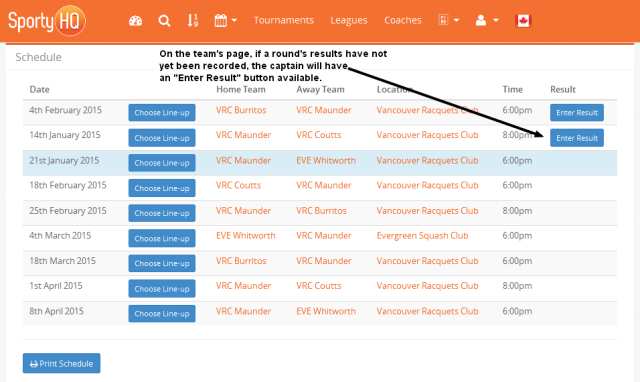
Clicking on Division Schedule shows the upcoming weeks. Indicates home, away, venue, time, and date.
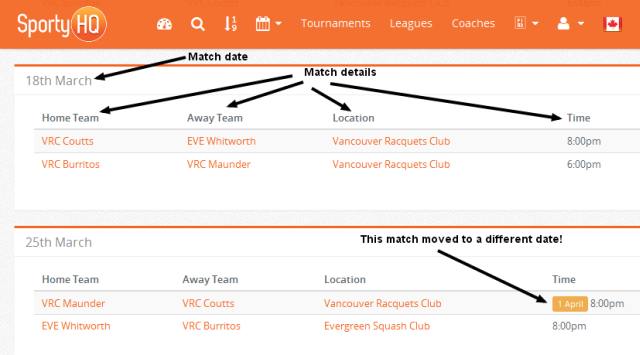
On the schedule pages you will see an occasional alert that a game is to be played on a date different from the date shown in the heading for the week.
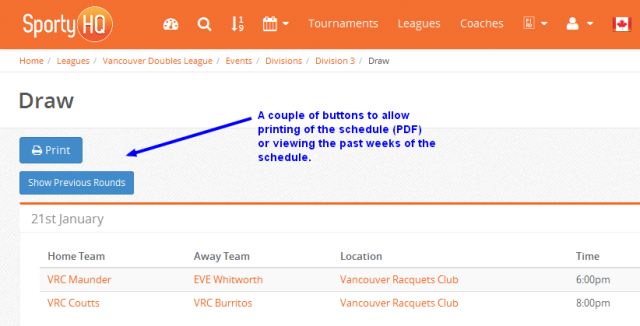
There is a print button if you want a hard copy as a reference or posting at the club.
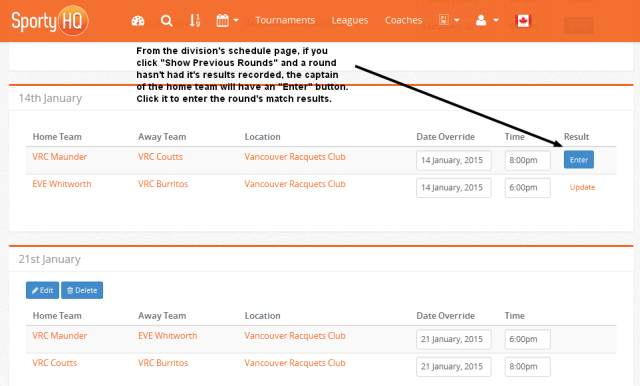
Click on Show Previous Rounds. That will take you back to the first week of schedule — for the schedule at the time of writing that would be January 7th.
You can scroll through to see the entire schedule.
At this time SHQ does not show which pair plays first. That information is on Rick Kochanski’s web page. The link to the schedule on the public barkncats site is:
http://barkncats.ca/league/doubles/201415/vdsl_schd_2015_v010.php
or
http://barkncats.com/league/doubles/201415/vdsl_schd_2015_v010.php
Entering Results for VDSL
Once you have clicked Show Previous Rounds, you will see a column with the heading Result.
If you are the captain (or perhaps any player on the team) you will see Enter in the Result column.
Click on Enter and follow the instructions to enter match data.
Use the drop down lists to enter the names of players. Select the match score. Optional to enter the game scores but if games are tied game scores will break tie. If you enter a 3-0 or 0-3 scores a new check box appears in case the match was a default.
It is a little annoying that if one player is not found in the drop down lists, the match cannot be recorded. I am working with SHQ to improve this.
The drop down list is an exact search. Usually better to search by last name.
If a name cannot be found do a couple of checks. Is the name on the Squash BC membership list? If not, check with player and or home club admin to ensure Squash BC membership. If is seems to be a SHQ problem (i.e. player is a Squash BC member) let Lynn Broman and or Rick Kochanski know or you may wish to send a note to SHQ directly.
You can go back to an match result entry to edit if an error was made — click Update.
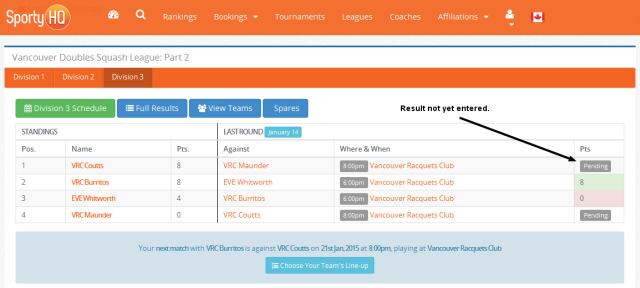
Going back to opening page for your division. You will see recent results entered. If a result has not yet been entered you will see Pending. There may be a match that will be played at a later date.
Note: you can also enter results by clicking the Enter Result button (if available) on the team's schedule shown on an individual team's page.
Team Rosters
When you click on View Teams you will see the complete roster for each team for that division. The captain is identified for each team. Following each player name there will be “1”, “2”, or “Spare”. The intention is that players likely to be on the "A" team are given a "1" designation while "2" indicates a player likely to be on the "B" team. "Spare" is intended to indicate a player that is not a regular team member.
I have not quite figured out the layers of security and access to various SHQ features.
Rick and Lynn have access to team rosters, match results, and some email options.
Captains can manage team rosters, enter match results, and some email options.
Players other than the captain see results and roster lists. Not sure what else may be available.
Team Page
To get to a specific team page, on the divisonal Teams page, click on the View Team Page button included in the team's listing. Or from the division display on the VDSL section of the VDL page, click on the appropriate
team name.
Here the captain may add or delete names. There is also a convenient email button.
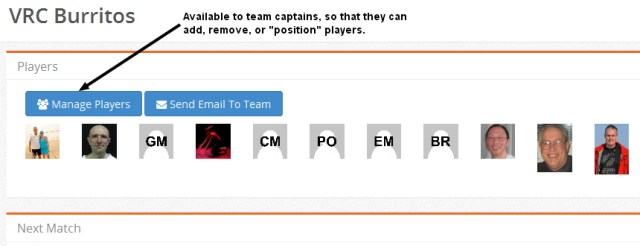
Manage Players
Clicking the Manage Players button takes you to the page to add or delete team members. There is
n edit button for each player; choices are 1, 2, and spare.
There can be only one captain, however the role can be passed from one player to another.
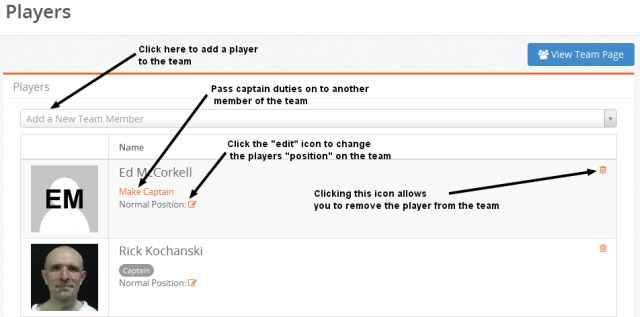
Add a New Team Member will find player names from the Squash BC membership list.
There have been problems where an individual or a club has not given Squash BC proper information and thus a name is not found by SHQ. Other times the SHQ has not located a valid name. Hopefully a fix will come.
Sending an email to your team
To send an email you fill in subject and message. All the names are shown in the header. As far as I know, you cannot edit the To: list.
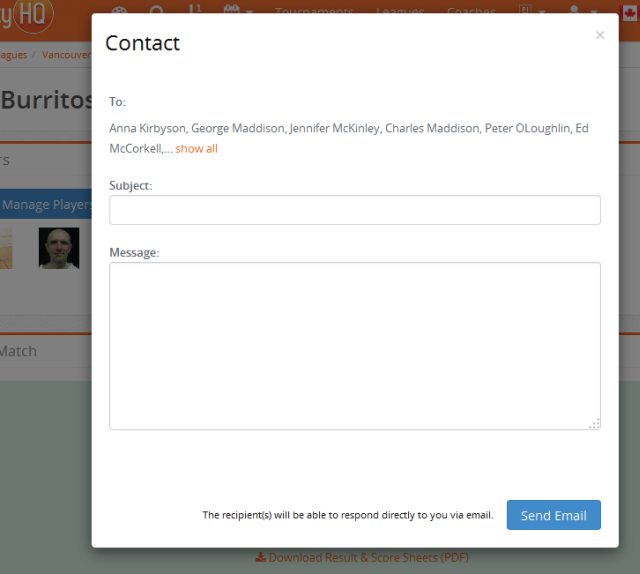
Each recipient receives the email and there is no indication who else has received the email which can be a little confusing …. recipients often wonder why they are only one to receive the email not realizing it is a group email. It may help if you indicate in the body of the email who is included in the To: list.